![logo-grunt.svg]](https://support.grunt.pro/hubfs/website%202025/logo-grunt.svg)
Cloud templates is an optional add-on for Grunt, clarify with your organization administrator if you should have access to it.
By default, any folder you add to the company space will be hidden from the other users in the company. This is to ensure that you can make the space clean and ready to use while not having to worry about anyone seeing the unfinished result, or getting access to objects and presentations they don't need just yet.
As a template administrator, go to the Grunt ribbon in PowerPoint -> Library, and click the three dots next to the folder you want to administrate access to, then click "Manage".
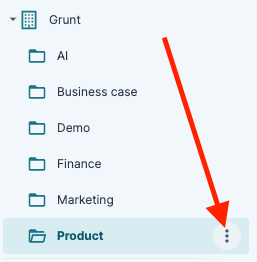
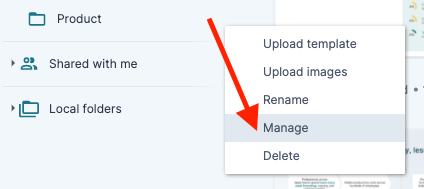
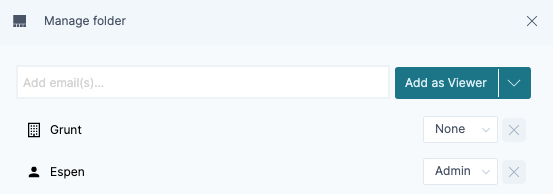
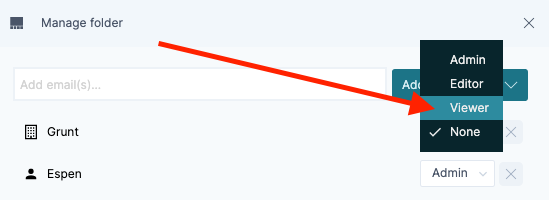
In this view, you can see that the company has no rights in the folder, which will make the folder hidden for everyone. As soon as you click the "None" box and change it to "Viewer", everyone who has a registered license in your company will be able to see- and use the content you've added to the folder
Tip: If your teammates are unable to see the folder even after changing the permissions, make sure they have restarted PowerPoint for the change to take effect for that specific user.