![logo-grunt.svg]](https://support.grunt.pro/hubfs/website%202025/logo-grunt.svg)
If the toolbar that shows up when clicking Grunt objects is misplaced or doesn't work, this can be due to PowerPoint being in compatibility mode.
Grunt requires the Display Settings be set to "Optimize for best appearance" to be able to work properly.
Please check at the bottom bar of PowerPoint whether you have an option for "Display Settings", and make sure that it's set to "Optimize for best appearance".
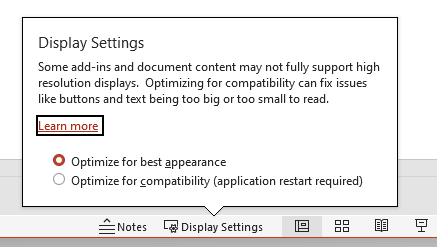
If this menu does not show up or you're still having issues, please reach out to us on support@grunt.pro